AI EMR Coding Assistance: How ICD-10-CM Suggestions Should Be Reviewed
Official Source Basis
- Official instructions matter: The CDC tabular file includes instructions such as Excludes1, Excludes2, Code First, Use Additional Code, and Code Also, which cannot be ignored by an AI suggestion.
- Date of service matters: CMS publishes ICD-10-CM update files by effective period; article drafts should cite the file year and update period used.
- Clinician-in-the-loop: AI can suggest or summarize, but final diagnosis and coding decisions require qualified human review.
AI coding assistance should be a review workflow, not an autopilot
AI medical scribes and AI EMR tools can read a consultation note and identify likely diagnosis language. That is valuable, but it is not the same as final coding. Diagnosis code selection can depend on specificity, causality, complications, current treatment, official notes, and the reason for the encounter.
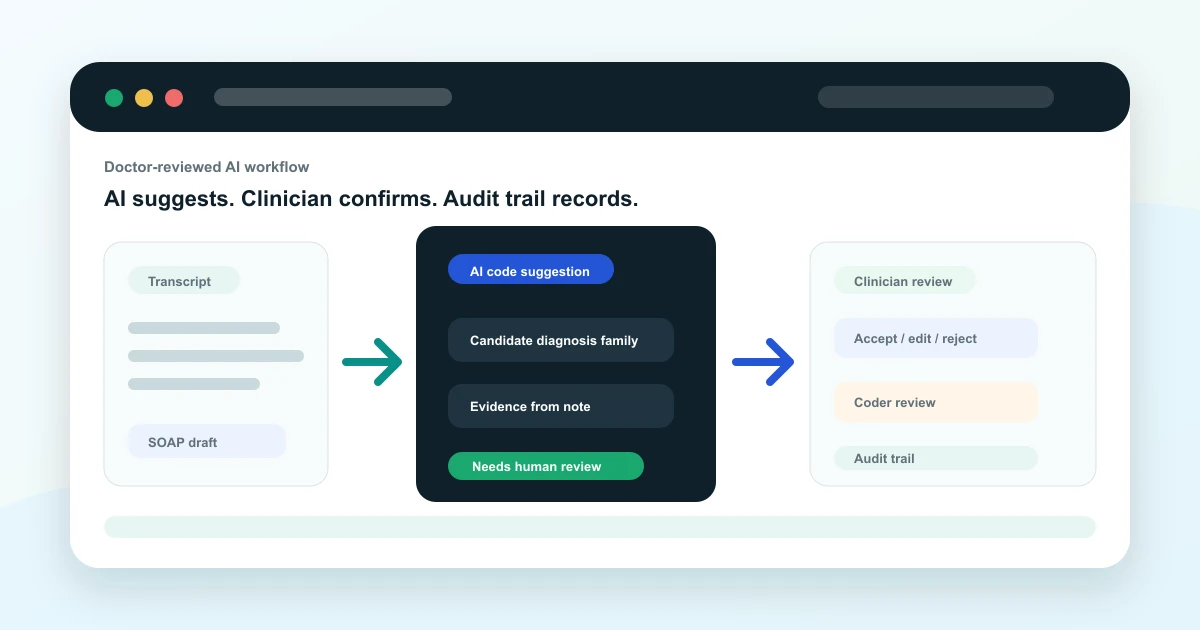
The safest implementation is a controlled review workflow. The AI drafts, the EMR explains why, the doctor confirms the clinical assessment, and coding or billing staff review claim-sensitive use cases.
What an AI EMR can safely assist with
Source note: this article uses the CDC/NCHS ICD-10-CM Tabular List, Index, and April 1, 2026 update files as the coding source. It is written for EMR workflow education, not as a substitute for official coding review.
An AI EMR can help by extracting diagnosis phrases, mapping them to candidate code families, identifying missing documentation detail, and reminding the doctor that additional review is needed. For example, if a note mentions a chronic condition and medication plan, the EMR can prompt the clinician to clarify whether the diagnosis is active, historical, suspected, or ruled out.
The product should make uncertainty visible. A suggestion with no confidence signal, no evidence text, and no review state is risky. A better workflow shows the source sentence, proposed diagnosis family, official-note flags, and a clear review action.
- Extract diagnosis terms from SOAP notes.
- Suggest candidate code families for review.
- Surface missing specificity before the note is locked.
- Link suggestions to the text that triggered them.
- Maintain an audit trail of review and approval.
What the doctor should review
The doctor should review whether the AI understood the patient correctly, whether the assessment matches the clinical evidence, and whether the final note says enough to support the diagnosis. The EMR should keep the review step close to the note editor, not hidden in a billing-only screen days later.
For multi-specialty clinics and hospitals, the review workflow should also respect roles. Doctors, coders, billing staff, administrators, and auditors should not all have the same permissions.
What coders and billing teams should review
Coding and billing teams need to confirm whether the selected diagnosis supports the encounter, service, claim workflow, and local policy. They may need to check official instructions, payer rules, or internal coding guidelines before a claim is submitted.
This article is educational and does not replace certified medical coding guidance. Final code selection should be reviewed by qualified clinical or coding staff using the official ICD-10-CM guidelines for the correct date of service.
Buyer checklist for AI coding assistance
When evaluating AI EMR software, ask how the system shows evidence, handles uncertainty, logs changes, and prevents silent finalization. The best workflow reduces repetitive work without removing professional judgment.
- Can the doctor see the AI-generated note before approval?
- Can diagnosis suggestions be accepted, modified, or rejected?
- Does the system show evidence text from the note?
- Are role-based permissions and audit trails available?
- Can billing teams review diagnosis context before claim handoff?
How Vivalyn EMR approaches AI-assisted review
Vivalyn EMR is designed around doctor-reviewed AI drafts. MedScribe can help convert conversations into structured clinical notes, while EMR workflows connect documentation, diagnosis context, patient history, billing, and analytics. The clinician stays in control of the final record.
Want to turn source-backed clinical documentation into an operational EMR workflow? Vivalyn EMR connects AI-assisted notes, doctor review, Patient 360, billing, analytics, and department workflows in one platform.
Continue From Coding Education to EMR Evaluation
Use this guide with the Vivalyn EMR feature set, department workflows, billing pages, and demo path.
Vivalyn EMR Hub
Start with the core AI EMR product page for clinics and hospitals.
Next pathEMR Features
Review OPD, IPD, Patient 360, billing, lab, pharmacy, and AI workflows.
Next pathEMR Software India
Commercial product page for ABDM-ready EMR software in India.
Next pathClinic Management Software
Evaluate front desk, appointments, billing, inventory, and self check-in.
Next pathEMR by Department
Find specialty and hospital department workflows mapped to EMR use cases.
Next pathPatient Experience
Review patient self check-in, reminders, engagement, and front-desk flow.
Next pathCompliance & Security
Evaluate privacy, access controls, audit trails, and deployment governance.
Next pathEMR by Country
Browse international EMR software pages by country and deployment context.
Next pathEMR by City
Explore city-specific EMR pages for Hyderabad, Bengaluru, Mumbai, and Delhi.
Next pathEMR Alternatives
Compare Vivalyn EMR with common clinic and hospital software alternatives.
Next path2026 EMR Burden Dataset
Use the benchmark dataset on Indian EMR adoption and documentation burden.
Next pathStart 30-Day Free Trial
Move from research to product walkthrough, trial, and implementation planning.
Next pathEMR Knowledge Hub
Read implementation, migration, ABDM, and hospital workflow guides.