ICD-10-CM in EMR Software: How Diagnosis Coding Fits the Clinical Workflow
Official Source Basis
- Official structure: The ICD-10-CM tabular file is organized by chapters, sections, categories, subcategories, codes, descriptions, and instructional notes.
- Instructional notes: The CDC tabular introduction defines Includes, Excludes1, Excludes2, Code First, Use Additional Code, and Code Also instructions.
- Clinical modification: NCHS describes ICD-10-CM as the US clinical modification used to code and classify medical diagnoses and conditions.
Why diagnosis coding belongs inside the EMR workflow
In many clinics, diagnosis coding is treated as a billing task that happens after the doctor has finished the visit. That separation creates avoidable rework. The clinical note, problem list, prescription, investigation order, billing item, and follow-up plan all depend on the same diagnostic context.
A strong EMR does not ask doctors to become coders during every consultation. It gives the care team a structured place to capture the diagnosis, review supporting details, and hand the record forward to billing or analytics without losing clinical meaning.
What ICD-10-CM adds to structured records
Source note: this article uses the CDC/NCHS ICD-10-CM Tabular List, Index, and April 1, 2026 update files as the coding source. It is written for EMR workflow education, not as a substitute for official coding review.
The useful lesson from ICD-10-CM is not only the code itself. The official tabular file carries descriptions and instructions that tell teams when a code family needs more context. Includes notes clarify category scope. Excludes notes warn when two concepts should not be treated as the same thing. Code First and Use Additional Code notes show that some conditions require sequencing or additional detail.
For an EMR buyer, that means diagnosis capture should not be a single free-text field. It should support structured diagnosis selection, documentation evidence, problem history, review state, and downstream use in billing and reporting.
A practical EMR diagnosis workflow
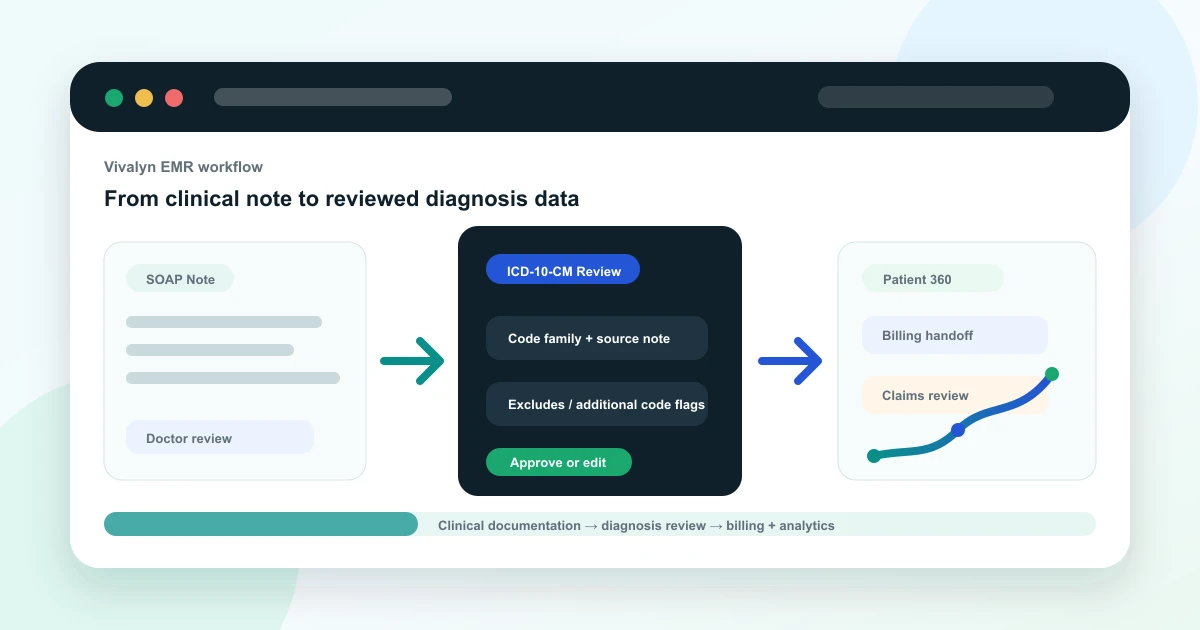
A doctor records the consultation, types a brief note, or uses an AI medical scribe. The EMR turns the encounter into a draft SOAP note. The clinician reviews the assessment, confirms the working diagnosis, and adds relevant context such as chronicity, associated findings, comorbidities, or follow-up plan.
From there, the diagnosis can update the problem list, support the billing handoff, and become part of the Patient 360 timeline. Administrators can later analyze common diagnoses, follow-up gaps, department trends, and service demand without manually reading every note.
- Consultation note captures the clinical narrative.
- Assessment links diagnosis context to the visit.
- Problem list preserves longitudinal history.
- Billing handoff receives reviewed diagnosis data.
- Analytics can group visits by structured diagnosis families.
Where AI can help
AI can reduce the blank-page problem. It can summarize the doctor-patient conversation, identify diagnosis terms mentioned in the note, surface missing documentation fields, and propose code families for review. That is especially useful when a busy OPD doctor needs to complete records quickly without switching between multiple screens.
The safest product pattern is evidence-linked assistance. If an AI suggests a diagnosis code family, the EMR should show which note text or visit context triggered the suggestion so the doctor or coder can review it.
Where doctor and coder review is required
ICD-10-CM coding depends on the full documentation context, official notes, specificity, date of service, and organization policy. AI should not silently finalize codes. A clinician must confirm the diagnosis, and trained coding or billing staff should review claim-sensitive use cases.
This article is educational and does not replace certified medical coding guidance. Final code selection should be reviewed by qualified clinical or coding staff using the official ICD-10-CM guidelines for the correct date of service.
How Vivalyn EMR operationalizes this
Vivalyn EMR connects AI-assisted notes, Patient 360, diagnosis capture, billing, department workflows, and analytics in one product path. Instead of leaving coding as a disconnected afterthought, the workflow can start inside the clinical encounter and continue into reviewed records and operational reporting.
Want to turn source-backed clinical documentation into an operational EMR workflow? Vivalyn EMR connects AI-assisted notes, doctor review, Patient 360, billing, analytics, and department workflows in one platform.
Continue From Coding Education to EMR Evaluation
Use this guide with the Vivalyn EMR feature set, department workflows, billing pages, and demo path.
Vivalyn EMR Hub
Start with the core AI EMR product page for clinics and hospitals.
Next pathEMR Features
Review OPD, IPD, Patient 360, billing, lab, pharmacy, and AI workflows.
Next pathEMR Software India
Commercial product page for ABDM-ready EMR software in India.
Next pathClinic Management Software
Evaluate front desk, appointments, billing, inventory, and self check-in.
Next pathEMR by Department
Find specialty and hospital department workflows mapped to EMR use cases.
Next pathPatient Experience
Review patient self check-in, reminders, engagement, and front-desk flow.
Next pathCompliance & Security
Evaluate privacy, access controls, audit trails, and deployment governance.
Next pathEMR by Country
Browse international EMR software pages by country and deployment context.
Next pathEMR by City
Explore city-specific EMR pages for Hyderabad, Bengaluru, Mumbai, and Delhi.
Next pathEMR Alternatives
Compare Vivalyn EMR with common clinic and hospital software alternatives.
Next path2026 EMR Burden Dataset
Use the benchmark dataset on Indian EMR adoption and documentation burden.
Next pathStart 30-Day Free Trial
Move from research to product walkthrough, trial, and implementation planning.
Next pathEMR Knowledge Hub
Read implementation, migration, ABDM, and hospital workflow guides.